Speak
Tap record and dictate naturally. SayWrite captures your words as you say them.
 SayWrite
SayWrite
Turn your voice into refined writing—completely free and completely private. Dictate on your iPhone, refine on-device, and keep adding to the same draft over time. No subscription. No limits. Works fully offline.
Free forever · iPhone · iOS 26 or later
How it works
No perfect phrasing required. Speak as you think, then use the result wherever you write—or keep building on the same draft later.
Tap record and dictate naturally. SayWrite captures your words as you say them.
Apple Intelligence on your device turns the transcript into clear, usable writing.
Copy and paste into email, Messages, Notes, Slack, docs, or any other app.
Living drafts
A draft does not have to be a one-shot capture. Open an existing draft and record more voice—append it, or stamp a timestamped log entry for journals, daily notes, and time-based work.
Add more transcribed or refined text to a draft you already started. Ideal when a thought continues later, or when you want one document that grows as you speak.
Choose “Add log entry,” or say “log entry” while dictating. SayWrite inserts a dated section so each update stays in order—useful for journaling, status logs, and project notes.
Use a single living draft as a running journal, a project log, or a lightweight workflow of dated updates—without switching apps or losing the thread.
From the draft library or draft detail, choose Add voice to append, or Add log entry for a timestamped section. While recording, say “log entry” or “log update” anytime to stamp the next part.
Free & private
The App Store is full of transcription, note-taking, and AI voice-to-text apps. Most charge a subscription—or put a ceiling on how much you can capture. SayWrite is built to stay free, with no paywall and no usage limits.
Download once. Keep using it. There is no monthly fee, no trial that expires, and no premium tier waiting behind a paywall.
Dictate as often as you need. SayWrite does not meter minutes, drafts, or refine runs the way many voice-capture apps do.
Nothing to sign up for. Your drafts stay on your iPhone—private by design, not locked behind a cloud login.
Other apps sell the same promise—speak, capture, turn talk into text—then charge a subscription or throttle what you can do for free.
SayWrite is intended to be completely free and completely private: on-device transcription and refining, local drafts, and no backend collecting your voice.
Screenshots
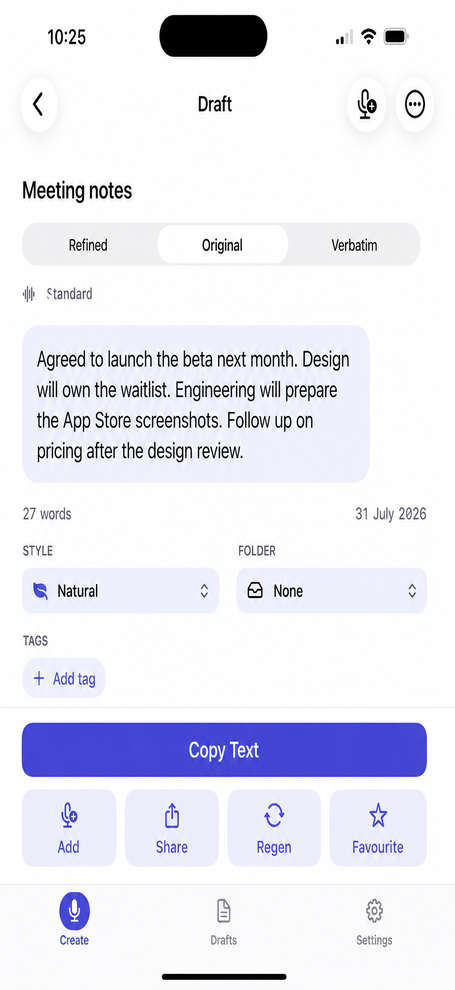
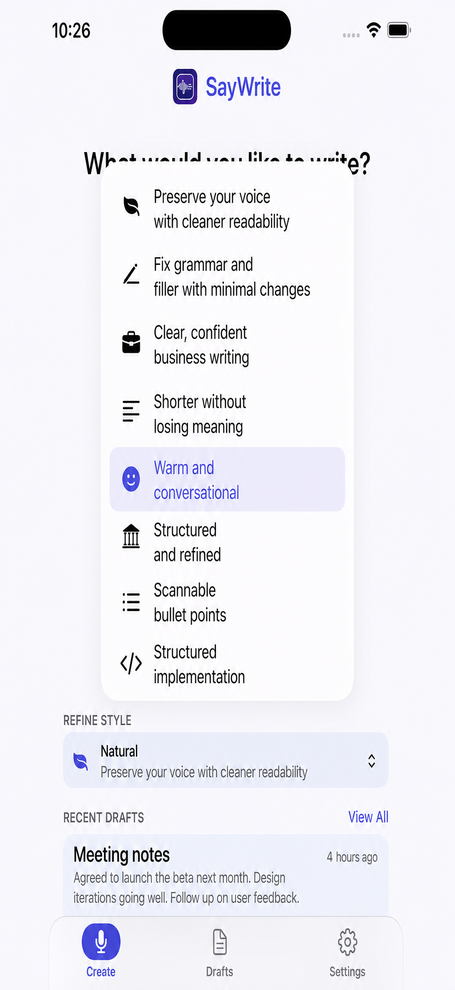
From first tap to refined copy—here’s what the app looks like on iPhone.
Features
SayWrite is a personal productivity tool—not a meeting recorder or chatbot. One person speaking, drafting, and writing clearly—without a subscription.
Requires iPhone with iOS 26 or later. AI refining needs Apple Intelligence enabled. Transcription still works without it.
No subscription, no in-app purchases, no usage caps. Speak, refine, and reuse drafts as often as you like.
No internet required. On a plane, a train, or anywhere without connectivity, SayWrite still transcribes and refines what you speak—everything runs on your iPhone.
Transcription and refining use Apple technologies on your iPhone. Drafts stay local. No account, no cloud sync, no analytics, no ads.
Append more voice to an existing draft, or add timestamped log entries for journals, daily notes, and time-based project updates.
From light edits to professional tone, friendly voice, formal structure, bullet points, and AI coding prompts.
Search, folders, tags, favourites, edit, regenerate from the original transcript, view verbatim text, duplicate, copy, and share.
While dictating, say phrases for new paragraphs, bullets, quotes, “scratch that,” and “log entry” to structure and correct as you speak.
Teach SayWrite names, products, and jargon once. Your custom dictionary boosts on-device recognition, fixes the transcript, and guides refining—synced across iPhone and Mac.
Personal writing instructions, tone preferences, and British English preference. Learn new terms when you fix a draft.
Say “Capture with SayWrite” to Siri, or use the Action Button, Control Centre, Lock Screen widgets, and Home Screen shortcuts to open the app and start dictating.
Offline by design
SayWrite does not depend on a network connection. Capture ideas in flight mode, underground, or out of coverage—then paste refined writing when you are back online.
Transcription and Apple Intelligence refining both run on-device. If you can open the app, you can speak, refine, and save—no Wi‑Fi or mobile data required.
Privacy first
SayWrite does not operate a backend for this app. Speech, refining, and storage happen on your device.
Microphone access is used only while you record. You can delete drafts, audio, and settings whenever you want.
Read the privacy policyMore from Cody One
Productivity and daily puzzles built for iPhone.
Get SayWrite
Free forever. Private by design. Speak naturally, refine on-device, grow drafts over time, and paste clear writing anywhere.